

Stop Privileged Sprawl Before It Spreads

Stop Privileged Sprawl Before It Spreads

Stop Privileged Sprawl Before It Spreads

You can’t protect what you can’t see. Discover, audit, and remediate every privileged account before attackers find them.

  1. Home
  2. Articles

New Feature: Local Admin & UAC Remediation

Privileged Access You Can’t See Is Privileged Access You Can’t Control. Privileged accounts multiply quickly across servers, endpoints, SaaS apps, and legacy systems. Over time, you’re left with:
  • Unknown and unused admin accounts
  • Orphaned accounts from past employees or contractors
  • Over-provisioned access nobody remembers granting
Attackers love this chaos. One forgotten account is all it takes for credential theft, lateral movement, and data loss.


Just in time accounts

Privileged Remediation in Action

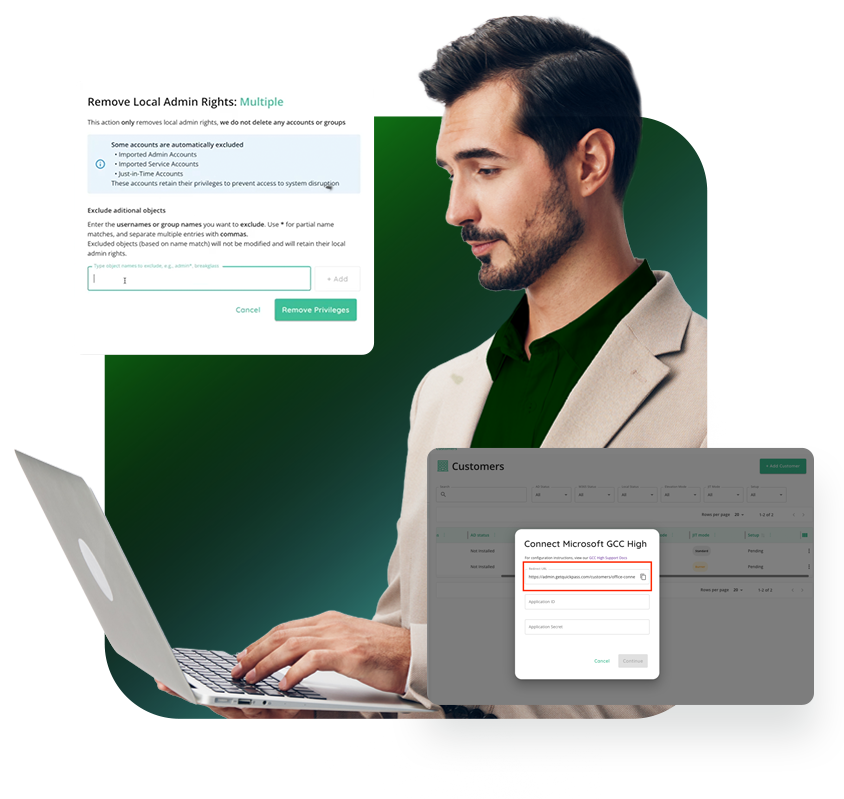
Understanding the risks is one thing, seeing how quickly you can remediate them is another. In this walkthrough, we show how QGuard identifies excessive local admin rights and unsafe UAC settings, then guides you through fixing them without slowing down operations.

Reduce Endpoint Risk Before Privileged Access Is Granted

See Local Admin Risk Instantly

Get immediate visibility into who has local administrator rights on every agented system. Identify unnecessary or forgotten admin access without running scripts or digging through RMM workflows, so you know exactly where risk exists before attackers do.

Remediate Safely at Scale

Remove excess local admin rights individually or in bulk while excluding required accounts like break-glass users. Update User Account Control (UAC) settings across one device or hundreds at once all from CyberQP.

Prepare Endpoints for PAM Success

Unnecessary admin access and misaligned UAC settings can stall privileged access rollouts. By cleaning up endpoints first, teams can confidently move forward with elevation policies, reduce friction for users, and ensure PAM works as intended from day one.

Just in time access

Automated Privileged Account Discovery & Remediation.

QGuard automatically discovers every privileged account across your environment: local admins, domain admins, service accounts, and shadow identities. We then give you clear visibility into what’s unknown. With fast risk auditing and guided remediation, you can right-size privileges, remove toxic access, and safely clean up inherited accounts from M&A without disrupting the business.


FAQs

Will QGuard disrupt production systems?

QGuard is designed for safe discovery and controlled remediation so you can phase changes in without outages.

Can QGuard help with newly acquired companies?

Yes. QGuard gives you visibility into inherited privileged accounts so you can quickly align access with your standards.

How long does it take to get value?
Most teams see high-risk accounts and easy wins in their first scan.

Book a Live QGuard Demo

See how CyberQP QGuard discovers and remediates privileged accounts across your environment, without weeks of manual effort.

    Basic JIT Access Isn’t Enough (Manufacturing)

    Basic JIT Access Isn’t Enough (Manufacturing)

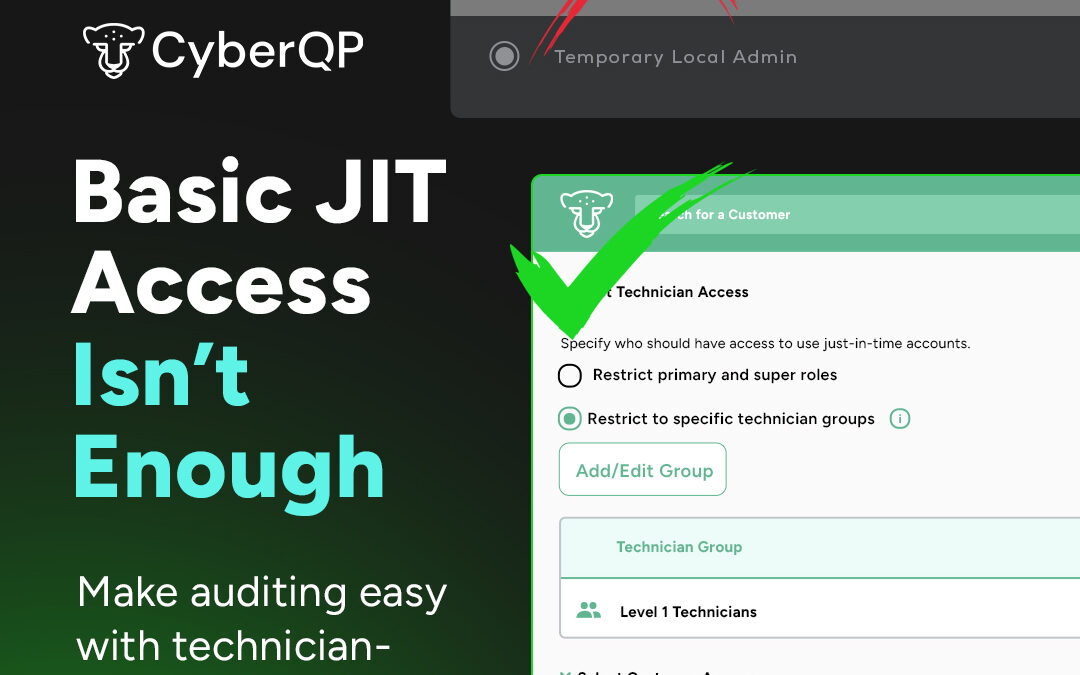
    Basic JIT Access Isn't Enough

    Make auditing easy with technician-specific JIT. No shared accounts.

    1. Home
    2. Articles

    PAM Just Got Better.

    CyberQP’s latest update gives you more control over how and where Just-in-Time (JIT) access is applied. With new customer-specific policies, you can define which customers or customer groups each JIT policy applies to, ensuring the right access is granted only when and where it’s needed.

    This enhancement helps IT teams reduce unnecessary access, streamline management, and maintain stronger security across all environments.


    Just in time accounts
    Just in time access

    Experience What Zero Trust Can Achieve.

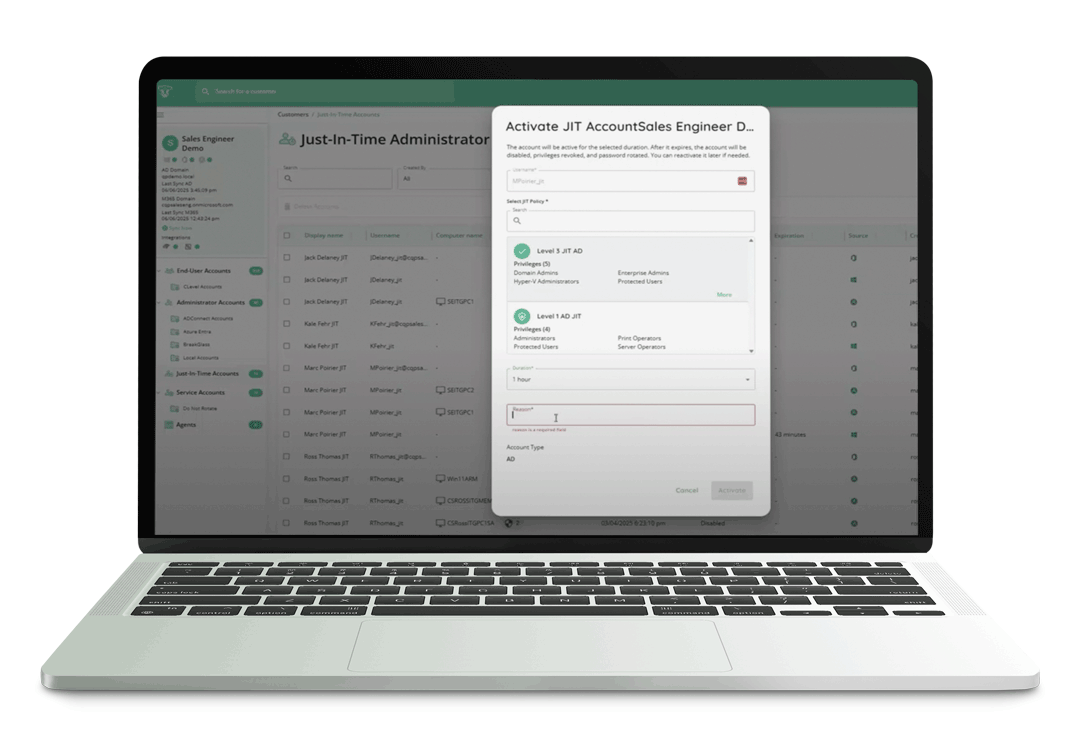
    JIT Accounts eliminate standing privilege by provisioning temporary, least-privilege access exactly when it’s needed and only for as long as it’s needed. This approach enforces Zero Standing Privilege, helps meet compliance and cyber insurance requirements, and dramatically reduces the attack surface of privileged accounts.


    Upgrade From Basic To Brilliant.

    See how CyberQP’s Just-in-Time Accounts let you grant temporary access exactly when it’s needed, with full visibility and audit tracking. Learn how customer-specific policies and least-privilege rules help reduce unnecessary standing privileges and keep your environment secure. The demo walks through how IT teams can simplify access management while staying compliant and in control.

    PAM At Your Fingertips.

    Enable IT Professionals to access endpoints instantly without passwords—using number matching MFA for phishing resistant identity verification. Meanwhile, enforce RBAC and maintain audit trails with technician passwordless authentication, tracking, and auditing. Experience a quick and secure login experience through our QTech App.

    Technicians spend too much time switching between tools, copying credentials, and juggling workflows. Every extra step increases the chance of errors and slows down response times. The QTech Browser Extension changes that by letting you manage JIT accounts and credentials directly in your browser, no context switching required.

    Compatability

    Broad Compatibility:

    The QTech Browser Extension is available now on the Chrome Web Store and works with all major Chromium-based browsers, including Chrome, Edge, and Brave.

    Credential Autofill

    Credential Autofill:

    Skip the copy-paste hassle. Autofill usernames, passwords, and TOTP codes directly into Microsoft login pages or launch Microsoft portals with credentials preloaded.

    One Click Activation

    One-Click Activation:

    Activate, enable, disable, extend time, or delete JIT accounts in seconds, right from your toolbar. Instantly find accounts across all customers, filter by customer, and view key details.

    Go Beyond Basic JIT Access.

    Book Your 30-min Platform Overview Today

      Basic JIT Access Isn’t Enough (Manufacturing)

      Basic JIT Access Isn’t Enough (legal)

      Basic JIT Access Isn't Enough

      Make auditing easy with technician-specific JIT. No shared accounts.

      1. Home
      2. Articles

      PAM Just Got Better.

      CyberQP’s latest update gives you more control over how and where Just-in-Time (JIT) access is applied. With new customer-specific policies, you can define which customers or customer groups each JIT policy applies to, ensuring the right access is granted only when and where it’s needed.

      This enhancement helps IT teams reduce unnecessary access, streamline management, and maintain stronger security across all environments.


      Just in time accounts
      Just in time access

      Experience What Zero Trust Can Achieve.

      JIT Accounts eliminate standing privilege by provisioning temporary, least-privilege access exactly when it’s needed and only for as long as it’s needed. This approach enforces Zero Standing Privilege, helps meet compliance and cyber insurance requirements, and dramatically reduces the attack surface of privileged accounts.


      Upgrade From Basic To Brilliant.

      See how CyberQP’s Just-in-Time Accounts let you grant temporary access exactly when it’s needed, with full visibility and audit tracking. Learn how customer-specific policies and least-privilege rules help reduce unnecessary standing privileges and keep your environment secure. The demo walks through how IT teams can simplify access management while staying compliant and in control.

      PAM At Your Fingertips.

      Enable IT Professionals to access endpoints instantly without passwords—using number matching MFA for phishing resistant identity verification. Meanwhile, enforce RBAC and maintain audit trails with technician passwordless authentication, tracking, and auditing. Experience a quick and secure login experience through our QTech App.

      Technicians spend too much time switching between tools, copying credentials, and juggling workflows. Every extra step increases the chance of errors and slows down response times. The QTech Browser Extension changes that by letting you manage JIT accounts and credentials directly in your browser, no context switching required.

      Compatability

      Broad Compatibility:

      The QTech Browser Extension is available now on the Chrome Web Store and works with all major Chromium-based browsers, including Chrome, Edge, and Brave.

      Credential Autofill

      Credential Autofill:

      Skip the copy-paste hassle. Autofill usernames, passwords, and TOTP codes directly into Microsoft login pages or launch Microsoft portals with credentials preloaded.

      One Click Activation

      One-Click Activation:

      Activate, enable, disable, extend time, or delete JIT accounts in seconds, right from your toolbar. Instantly find accounts across all customers, filter by customer, and view key details.

      Go Beyond Basic JIT Access.

      Book Your 30-min Platform Overview Today

        Basic JIT Access Isn’t Enough (Manufacturing)

        Basic JIT Access Isn’t Enough (healthcare)

        Basic JIT Access Isn't Enough

        Make auditing easy with technician-specific JIT. No shared accounts.

        1. Home
        2. Articles

        PAM Just Got Better.

        CyberQP’s latest update gives you more control over how and where Just-in-Time (JIT) access is applied. With new customer-specific policies, you can define which customers or customer groups each JIT policy applies to, ensuring the right access is granted only when and where it’s needed.

        This enhancement helps IT teams reduce unnecessary access, streamline management, and maintain stronger security across all environments.


        Just in time accounts
        Just in time access

        Experience What Zero Trust Can Achieve.

        JIT Accounts eliminate standing privilege by provisioning temporary, least-privilege access exactly when it’s needed and only for as long as it’s needed. This approach enforces Zero Standing Privilege, helps meet compliance and cyber insurance requirements, and dramatically reduces the attack surface of privileged accounts.


        Upgrade From Basic To Brilliant.

        See how CyberQP’s Just-in-Time Accounts let you grant temporary access exactly when it’s needed, with full visibility and audit tracking. Learn how customer-specific policies and least-privilege rules help reduce unnecessary standing privileges and keep your environment secure. The demo walks through how IT teams can simplify access management while staying compliant and in control.

        PAM At Your Fingertips.

        Enable IT Professionals to access endpoints instantly without passwords—using number matching MFA for phishing resistant identity verification. Meanwhile, enforce RBAC and maintain audit trails with technician passwordless authentication, tracking, and auditing. Experience a quick and secure login experience through our QTech App.

        Technicians spend too much time switching between tools, copying credentials, and juggling workflows. Every extra step increases the chance of errors and slows down response times. The QTech Browser Extension changes that by letting you manage JIT accounts and credentials directly in your browser, no context switching required.

        Compatability

        Broad Compatibility:

        The QTech Browser Extension is available now on the Chrome Web Store and works with all major Chromium-based browsers, including Chrome, Edge, and Brave.

        Credential Autofill

        Credential Autofill:

        Skip the copy-paste hassle. Autofill usernames, passwords, and TOTP codes directly into Microsoft login pages or launch Microsoft portals with credentials preloaded.

        One Click Activation

        One-Click Activation:

        Activate, enable, disable, extend time, or delete JIT accounts in seconds, right from your toolbar. Instantly find accounts across all customers, filter by customer, and view key details.

        Go Beyond Basic JIT Access.

        Book Your 30-min Platform Overview Today

          Basic JIT Access Isn’t Enough (Manufacturing)

          Basic JIT Access Isn’t Enough (Finance)

          Basic JIT Access Isn't Enough

          Make auditing easy with technician-specific JIT. No shared accounts.

          1. Home
          2. Articles

          PAM Just Got Better.

          CyberQP’s latest update gives you more control over how and where Just-in-Time (JIT) access is applied. With new customer-specific policies, you can define which customers or customer groups each JIT policy applies to, ensuring the right access is granted only when and where it’s needed.

          This enhancement helps IT teams reduce unnecessary access, streamline management, and maintain stronger security across all environments.


          Just in time accounts
          Just in time access

          Experience What Zero Trust Can Achieve.

          JIT Accounts eliminate standing privilege by provisioning temporary, least-privilege access exactly when it’s needed and only for as long as it’s needed. This approach enforces Zero Standing Privilege, helps meet compliance and cyber insurance requirements, and dramatically reduces the attack surface of privileged accounts.


          Upgrade From Basic To Brilliant.

          See how CyberQP’s Just-in-Time Accounts let you grant temporary access exactly when it’s needed, with full visibility and audit tracking. Learn how customer-specific policies and least-privilege rules help reduce unnecessary standing privileges and keep your environment secure. The demo walks through how IT teams can simplify access management while staying compliant and in control.

          PAM At Your Fingertips.

          Enable IT Professionals to access endpoints instantly without passwords—using number matching MFA for phishing resistant identity verification. Meanwhile, enforce RBAC and maintain audit trails with technician passwordless authentication, tracking, and auditing. Experience a quick and secure login experience through our QTech App.

          Technicians spend too much time switching between tools, copying credentials, and juggling workflows. Every extra step increases the chance of errors and slows down response times. The QTech Browser Extension changes that by letting you manage JIT accounts and credentials directly in your browser, no context switching required.

          Compatability

          Broad Compatibility:

          The QTech Browser Extension is available now on the Chrome Web Store and works with all major Chromium-based browsers, including Chrome, Edge, and Brave.

          Credential Autofill

          Credential Autofill:

          Skip the copy-paste hassle. Autofill usernames, passwords, and TOTP codes directly into Microsoft login pages or launch Microsoft portals with credentials preloaded.

          One Click Activation

          One-Click Activation:

          Activate, enable, disable, extend time, or delete JIT accounts in seconds, right from your toolbar. Instantly find accounts across all customers, filter by customer, and view key details.

          Go Beyond Basic JIT Access.

          Book Your 30-min Platform Overview Today

            Basic JIT Access Isn’t Enough (Manufacturing)

            Basic JIT Access Isn’t Enough (Education)

            Basic JIT Access Isn't Enough

            Make auditing easy with technician-specific JIT. No shared accounts.

            1. Home
            2. Articles

            PAM Just Got Better.

            CyberQP’s latest update gives you more control over how and where Just-in-Time (JIT) access is applied. With new customer-specific policies, you can define which customers or customer groups each JIT policy applies to, ensuring the right access is granted only when and where it’s needed.

            This enhancement helps IT teams reduce unnecessary access, streamline management, and maintain stronger security across all environments.


            Just in time accounts
            Just in time access

            Experience What Zero Trust Can Achieve.

            JIT Accounts eliminate standing privilege by provisioning temporary, least-privilege access exactly when it’s needed and only for as long as it’s needed. This approach enforces Zero Standing Privilege, helps meet compliance and cyber insurance requirements, and dramatically reduces the attack surface of privileged accounts.


            Upgrade From Basic To Brilliant.

            See how CyberQP’s Just-in-Time Accounts let you grant temporary access exactly when it’s needed, with full visibility and audit tracking. Learn how customer-specific policies and least-privilege rules help reduce unnecessary standing privileges and keep your environment secure. The demo walks through how IT teams can simplify access management while staying compliant and in control.

            PAM At Your Fingertips.

            Enable IT Professionals to access endpoints instantly without passwords—using number matching MFA for phishing resistant identity verification. Meanwhile, enforce RBAC and maintain audit trails with technician passwordless authentication, tracking, and auditing. Experience a quick and secure login experience through our QTech App.

            Technicians spend too much time switching between tools, copying credentials, and juggling workflows. Every extra step increases the chance of errors and slows down response times. The QTech Browser Extension changes that by letting you manage JIT accounts and credentials directly in your browser, no context switching required.

            Compatability

            Broad Compatibility:

            The QTech Browser Extension is available now on the Chrome Web Store and works with all major Chromium-based browsers, including Chrome, Edge, and Brave.

            Credential Autofill

            Credential Autofill:

            Skip the copy-paste hassle. Autofill usernames, passwords, and TOTP codes directly into Microsoft login pages or launch Microsoft portals with credentials preloaded.

            One Click Activation

            One-Click Activation:

            Activate, enable, disable, extend time, or delete JIT accounts in seconds, right from your toolbar. Instantly find accounts across all customers, filter by customer, and view key details.

            Go Beyond Basic JIT Access.

            Book Your 30-min Platform Overview Today