
A Smarter, Faster CyberQP Onboarding and Deployment Experience

A Smarter, Faster CyberQP Onboarding and Deployment Experience

We are excited to announce a major upgrade to CyberQP onboarding and deployment. This update introduces a Guided Onboarding UI Wizard, a Unified Agent Deployment Page, and a smarter Agent Installer. Together, these improvements reduce setup friction, improve deployment visibility, and help MSPs and Service Desks roll out CyberQP faster across all customer environments.

Guided Onboarding UI for Clear, Structured Setup

The new Guided Onboarding UI provides a clear and consistent experience for both new and existing CyberQP partners.

For first time setup, technicians are guided step by step through adding customers, deploying agents, and configuring core features. Each step includes context around what is being configured and why it matters, helping teams complete setup correctly the first time.

For existing partners, the onboarding UI transitions into a deployment progress tracker. This gives teams real time visibility into customer readiness, feature adoption, and remaining deployment tasks across the entire tenant.

With skippable steps, contextual recommendations, and live progress indicators, technicians can quickly see what is complete, what still requires action, and where to go next.

Unified Agent Deployment Page

To simplify deployments across different environments, CyberQP now includes a Unified Agent Deployment Page that centralizes all supported deployment methods in one place.

From this page, technicians can deploy agents using:

  • Manual installation
  • Scripted deployments
  • RMM based rollouts including Datto, ConnectWise, NinjaOne, N Able, Kaseya, and Intune

Deployment scripts are copy ready and automatically populated with customer specific values. A real time agent detection table updates as systems come online and supports manual assignment when metadata is not available.

This centralized approach reduces time spent searching for instructions and improves consistency across single site and multi customer deployments.

Smarter Agent Installer

The CyberQP Agent Installer has been enhanced to remove common deployment friction. Technicians no longer need to locate install tokens, customer IDs, or custom scripts before installation.

Agents can now be installed by providing a customer name or installed without assignment and linked later through the Agents dashboard. The installer retrieves tenant and customer details automatically through the CyberQP API and can create new customers during install when enabled.

Existing installation workflows using agent IDs remain fully supported. Additional improvements include custom script support, region specific installers, automatic restarts, and intelligent customer matching based on integration company names.

What This Means for CyberQP Partners

This updated onboarding and deployment experience delivers:

  • Faster time to value with fewer prerequisites
  • Reduced friction during initial setup and ongoing deployments
  • Clear visibility into onboarding progress across all customers
  • Consistent deployments across environments and RMM tools
  • A foundation for future automation using modern installer architecture

Get Started

Log in to your CyberQP tenant to explore the new Guided Onboarding UI and Unified Agent Deployment Page. 

For guidance on account organization and deployment structure, review the documentation here: 

 https://support.getquickpass.com/hc/en-us/articles/36981297270423-Move-Account-between-Sections-Change-Account-Type 

If you have questions or need help getting started, reach out to the CyberQP support team to see it in action. 

Stop Privileged Sprawl Before It Spreads

Stop Privileged Sprawl Before It Spreads

Stop Privileged Sprawl Before It Spreads

You can’t protect what you can’t see. Discover, audit, and remediate every privileged account before attackers find them.

New Feature: Local Admin & UAC Remediation

Privileged Access You Can’t See Is Privileged Access You Can’t Control. Privileged accounts multiply quickly across servers, endpoints, SaaS apps, and legacy systems. Over time, you’re left with:
  • Unknown and unused admin accounts
  • Orphaned accounts from past employees or contractors
  • Over-provisioned access nobody remembers granting
Attackers love this chaos. One forgotten account is all it takes for credential theft, lateral movement, and data loss.


Just in time accounts

Privileged Remediation in Action

Understanding the risks is one thing, seeing how quickly you can remediate them is another. In this walkthrough, we show how QGuard identifies excessive local admin rights and unsafe UAC settings, then guides you through fixing them without slowing down operations.

Reduce Endpoint Risk Before Privileged Access Is Granted

See Local Admin Risk Instantly

Get immediate visibility into who has local administrator rights on every agented system. Identify unnecessary or forgotten admin access without running scripts or digging through RMM workflows, so you know exactly where risk exists before attackers do.

Remediate Safely at Scale

Remove excess local admin rights individually or in bulk while excluding required accounts like break-glass users. Update User Account Control (UAC) settings across one device or hundreds at once all from CyberQP.

Prepare Endpoints for PAM Success

Unnecessary admin access and misaligned UAC settings can stall privileged access rollouts. By cleaning up endpoints first, teams can confidently move forward with elevation policies, reduce friction for users, and ensure PAM works as intended from day one.

Just in time access

Automated Privileged Account Discovery & Remediation.

QGuard automatically discovers every privileged account across your environment: local admins, domain admins, service accounts, and shadow identities. We then give you clear visibility into what’s unknown. With fast risk auditing and guided remediation, you can right-size privileges, remove toxic access, and safely clean up inherited accounts from M&A without disrupting the business.


FAQs

Will QGuard disrupt production systems?

QGuard is designed for safe discovery and controlled remediation so you can phase changes in without outages.

Can QGuard help with newly acquired companies?

Yes. QGuard gives you visibility into inherited privileged accounts so you can quickly align access with your standards.

How long does it take to get value?
Most teams see high-risk accounts and easy wins in their first scan.

Book a Live QGuard Demo

See how CyberQP QGuard discovers and remediates privileged accounts across your environment, without weeks of manual effort.

    CMMC Responsibility Matrix for Audit Preparation

    CMMC Responsibility Matrix for Audit Preparation

    WHITE PAPER

    CMMC Responsibility Matrix for Audit Preparation

    Get Audit Ready

    Preparing for a CMMC assessment can be complex when control ownership isn’t clear. Our CMMC Shared Responsibility Matrix helps you quickly align CyberQP’s platform capabilities with customer responsibilities so you can streamline audit prep, eliminate guesswork, and confidently demonstrate control ownership.


    MSP Incident Insights

    Stop Guessing, Start Demonstrating Control.

    Preparing for an audit isn’t just about having controls in place, it’s about clearly showing who is responsible for what. Our Shared Responsibility Matrix breaks down NIST 800-171 and CMMC practices line by line, mapping each requirement to CyberQP’s role and the customer’s role.

    Instead of vague assumptions, you get documented clarity auditors expect: which controls are partially enforced by CyberQP, where customer configuration is required, and how responsibilities align across access control, authorization, and enforcement. This makes audit conversations faster, cleaner, and far easier to defend.

    Examples of CMMC 2.0 Security Controls That PAM Supports

    Access Control (AC):

    Privileged Access Management solutions will help you limit access to sensitive information, keeping the number of security risks as low as possible and minimizing your attack surfaces.

    MSP Statistics

    Identification and Authentication (IA):

    This requirement calls for security measures to safeguard CUI and only grant access to authorize users, which specifically calls for identity verification before granting access to an organization’s digital environments or devices.

    MSP Statistics
    MSP Incident Insights

    Are You Audit Ready?

    This guide gives you clear, documented evidence of how privileged access controls are shared, enforced, and validated against CMMC and NIST 800-171 requirements. If you are preparing for an assessment or tightening controls ahead of one, this reference helps you walk into the audit with clarity and confidence.

    It is 2026. Is Your Privileged Password Rotation Still Not Automated

    It is 2026. Is Your Privileged Password Rotation Still Not Automated

    The Louvre Heist that Turned into a Password Horror Story

    When investigators revealed that the password to the Louvre Museum video surveillance system was simply “Louvre”, it sounded like a meme. It was not a joke. According to reports and a museum employee, that single word granted access to the video surveillance system at the time of a jewel heist worth about 102 million dollars in October. (ABC News) 

    The thieves reached the Apollo Gallery through a window, smashed display cases, and escaped with royal jewels in roughly seven minutes. The cameras, alarms, and guards were backed by a digital perimeter that could be opened with the museum’s own name. (New York Post) 

    For IT professionals and service desks, this is more than an embarrassing headline. It is a real-world reminder of what happens when privileged passwords are weak, static, and never truly brought under control

    A Privileged Access Problem Hiding Behind One Bad Password

    The Louvre story is not just about a single silly password. Years before the heist, a French national cybersecurity audit warned that the video surveillance system used “LOUVRE” as its password and another system used “THALES,” both simple words tied to the brand. The same reports highlighted workstations still running Windows 2000 and other unsupported platforms, along with broader weaknesses in alarms and CCTV. (Tom’s Hardware) 

    That pattern is familiar. Critical systems guarded by static credentials, legacy infrastructure that is hard to touch, and audit findings that sit in documents instead of driving real remediation. In most environments, there is at least one server, application, or security system that everyone is afraid to change. The account works, no one remembers exactly which services depend on it, and the password has not been rotated in years. 

    The Louvre simply had that story play out in public, with the world’s most famous museum at the center and the word “LOUVRE” printed in headlines as a password.

    Why Manual Privileged Password Rotation Keeps Failing

    Many IT teams still depend on manual privileged password rotation. A spreadsheet tracks admin logins, a recurring ticket reminds someone to update them, and rotation happens when there is time and when nobody is worried about breaking something. On paper, that looks like control. In practice, it collides with reality

    Daily work always feels more urgent than changing a password for a system that appears to be running fine. Projects and incidents push rotation to next week, then next month. Temporary exceptions become permanent, and “we will fix that after this release” quietly turns into “we never fixed that.” Over time, you accumulate exactly the kind of long-lived privileged credentials that attackers love. 

    There is also simple scale. A typical environment includes domain and local administrators, privileged roles in Microsoft 365 and Entra ID, service accounts for backup, monitoring, CCTV, building management, and line of business applications, plus break-glass and shared emergency accounts. Tracking how each of those passwords behaves over time without automation is almost impossible

    Fear adds another layer. Service desks inherit legacy applications that nobody fully understands. If you are not certain what will break when a service account password changes, the safest short-term decision is to leave it alone. That is how a password like “LOUVRE” or an old default string survives for years. 

    Attackers are not guessing manually. They use credential stuffing, stolen passwords, scanning, and automation. Any static privileged password that never rotates is an open invitation.

    How CyberQP QGuard Changes the Privileged Password Story

    CyberQP built QGuard as a Privileged Access Management solution that follows Zero Trust principles. QGuard focuses on eliminating standing privileges, providing Just in Time access for technicians, and automating credential rotation so that privileged passwords do not sit unchanged for years.

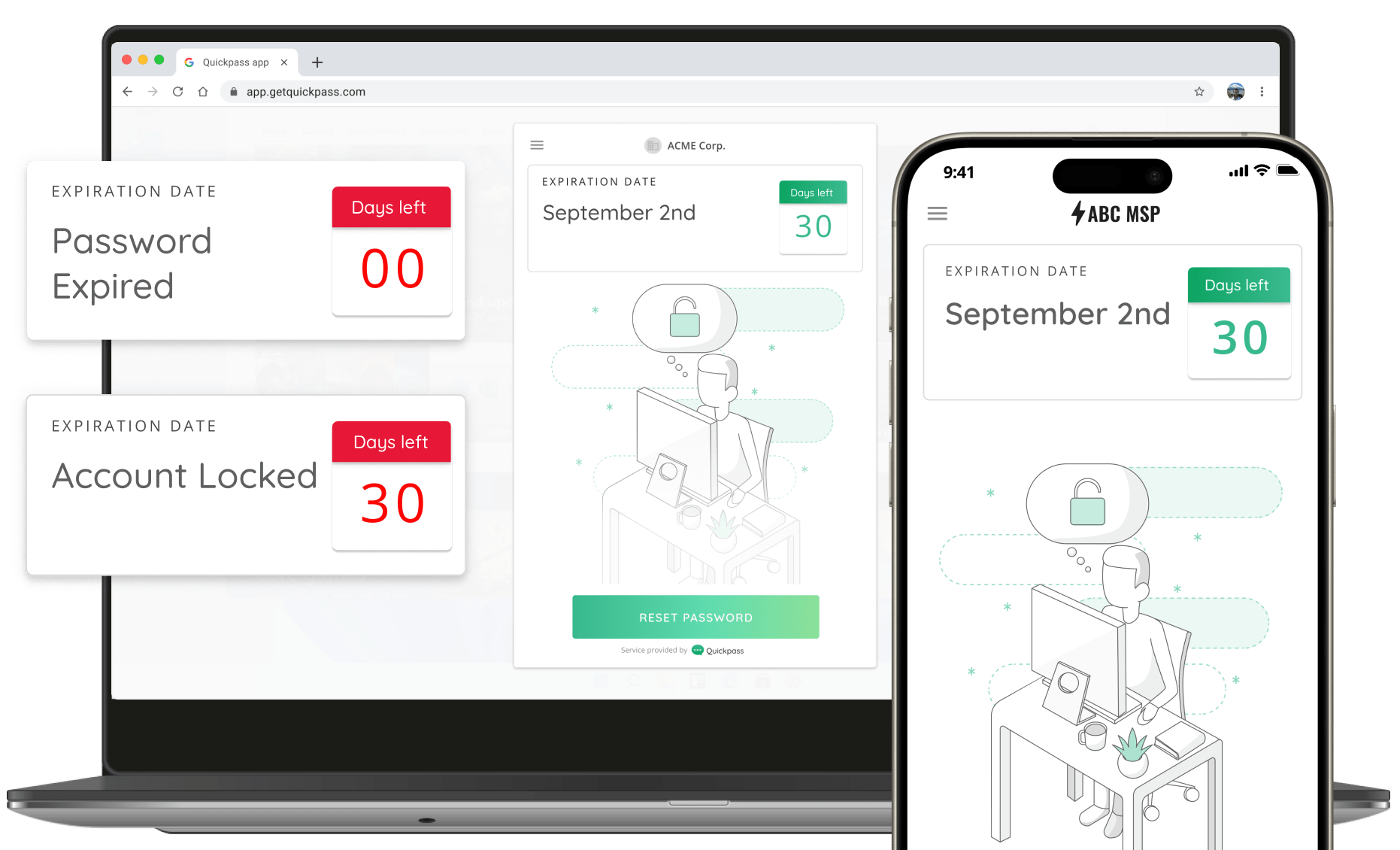
    Instead of rotating individual accounts on a case-by-case basis, QGuard uses Password Rotation Policies. These let IT teams define how admin and service account passwords should behave and apply those rules across many environments. CyberQP’s own documentation explains that these policies set global rotation settings for privileged accounts and can be assigned to multiple customers or systems, which brings consistency without configuring each one individually.  

    In practice, that means you can decide that local administrators must use long, random passwords that rotate on a fixed schedule, that certain high value service accounts rotate even more frequently, and that anything outside those rules is clearly visible. Under this model, a trivial password like “LOUVRE” would not remain quietly in place. It would be forced to rotate or would stand out in dashboards and reports.

    QGuard then goes a step further with Just in Time privileged access. Rather than keeping permanent admin accounts, technicians request elevated access when they need it. The platform creates or enables a temporary privileged identity, protects it with passwordless login and multi-factor authentication, and removes or disables that access when the work window ends. Documentation and updates from CyberQP describe how Just in Time account policies allow granular control of duration and scope while supporting least privilege.  

    For service desks, this means fewer standing admin accounts to manage, shorter exposure windows for any credentials that might be stolen, and a clean audit trail that ties privileged actions back to individual technicians. For attackers, it means less to latch onto and less time to exploit anything they do find. 

    Turning a Headline into a Push for Better Privileged Access

    The revelation that the Louvre’s surveillance password was “Louvre” has generated plenty of jokes, including social posts about the next version being “Louvre1.” (The Daily Dot) Behind the humor is a serious message for every IT professional and service desk.

    Somewhere in almost every environment, there is a system with its own version of that password, a long-lived privileged credential that nobody has rotated recently, and that everyone hopes attackers will never find. The difference now is that the tools exist to fix that problem without relying on memory, spreadsheets, or wishful thinking.

    The Louvre just showed the world what happens when weak, privileged passwords and aging systems are left alone for too long. It is 2025. This is the moment to make sure your own privileged password rotation does not end up telling a similar story.

    Book a demo and watch how quickly you can bring privileged accounts under policy-driven rotation, replace standing admin access with Just in Time workflows, and give auditors, executives, and insurers the proof they are asking for. 

    Basic JIT Access Isn’t Enough (Manufacturing)

    Basic JIT Access Isn’t Enough (Manufacturing)

    Basic JIT Access Isn't Enough

    Make auditing easy with technician-specific JIT. No shared accounts.

    PAM Just Got Better.

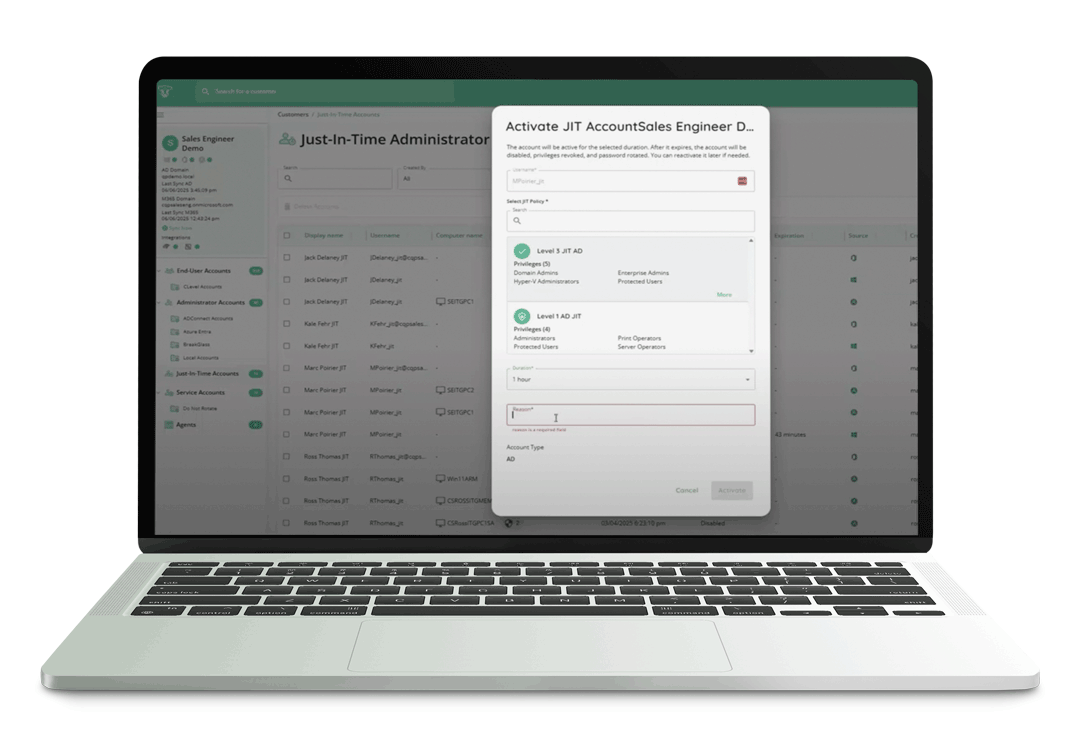
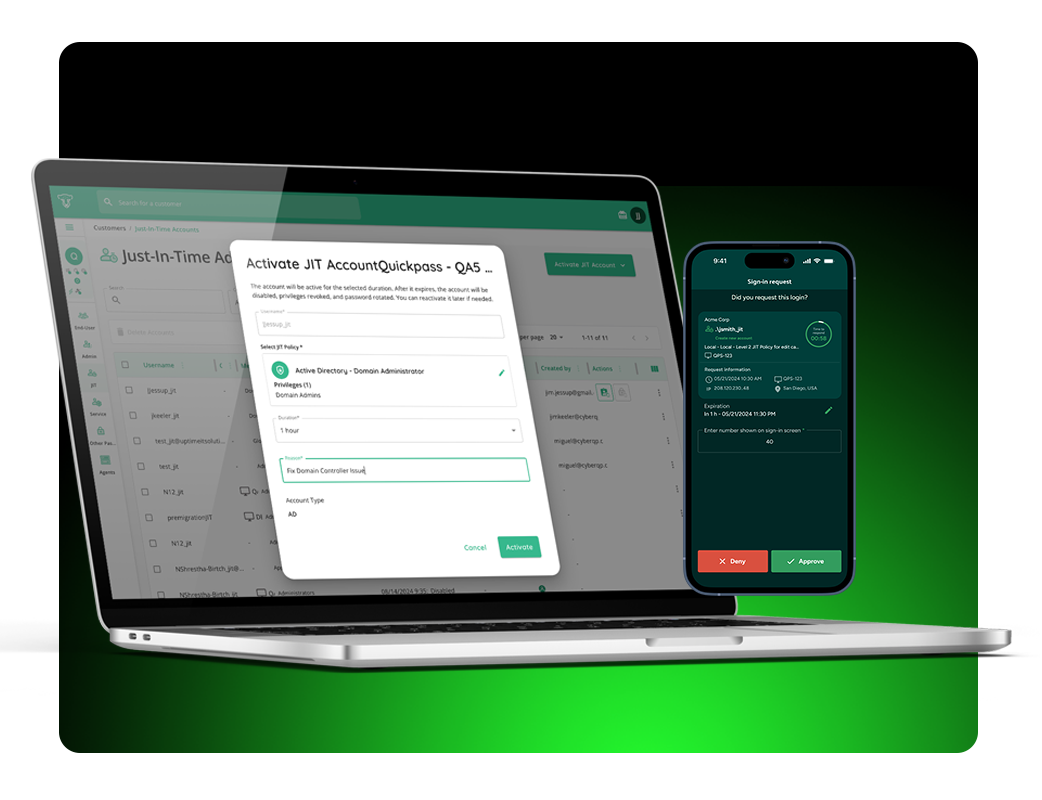
    CyberQP’s latest update gives you more control over how and where Just-in-Time (JIT) access is applied. With new customer-specific policies, you can define which customers or customer groups each JIT policy applies to, ensuring the right access is granted only when and where it’s needed.

    This enhancement helps IT teams reduce unnecessary access, streamline management, and maintain stronger security across all environments.


    Just in time accounts
    Just in time access

    Experience What Zero Trust Can Achieve.

    JIT Accounts eliminate standing privilege by provisioning temporary, least-privilege access exactly when it’s needed and only for as long as it’s needed. This approach enforces Zero Standing Privilege, helps meet compliance and cyber insurance requirements, and dramatically reduces the attack surface of privileged accounts.


    Upgrade From Basic To Brilliant.

    See how CyberQP’s Just-in-Time Accounts let you grant temporary access exactly when it’s needed, with full visibility and audit tracking. Learn how customer-specific policies and least-privilege rules help reduce unnecessary standing privileges and keep your environment secure. The demo walks through how IT teams can simplify access management while staying compliant and in control.

    PAM At Your Fingertips.

    Enable IT Professionals to access endpoints instantly without passwords—using number matching MFA for phishing resistant identity verification. Meanwhile, enforce RBAC and maintain audit trails with technician passwordless authentication, tracking, and auditing. Experience a quick and secure login experience through our QTech App.

    Technicians spend too much time switching between tools, copying credentials, and juggling workflows. Every extra step increases the chance of errors and slows down response times. The QTech Browser Extension changes that by letting you manage JIT accounts and credentials directly in your browser, no context switching required.

    Compatability

    Broad Compatibility:

    The QTech Browser Extension is available now on the Chrome Web Store and works with all major Chromium-based browsers, including Chrome, Edge, and Brave.

    Credential Autofill

    Credential Autofill:

    Skip the copy-paste hassle. Autofill usernames, passwords, and TOTP codes directly into Microsoft login pages or launch Microsoft portals with credentials preloaded.

    One Click Activation

    One-Click Activation:

    Activate, enable, disable, extend time, or delete JIT accounts in seconds, right from your toolbar. Instantly find accounts across all customers, filter by customer, and view key details.

    Go Beyond Basic JIT Access.

    Book Your 30-min Platform Overview Today