

Simplifying Security with Password Rotation Policies
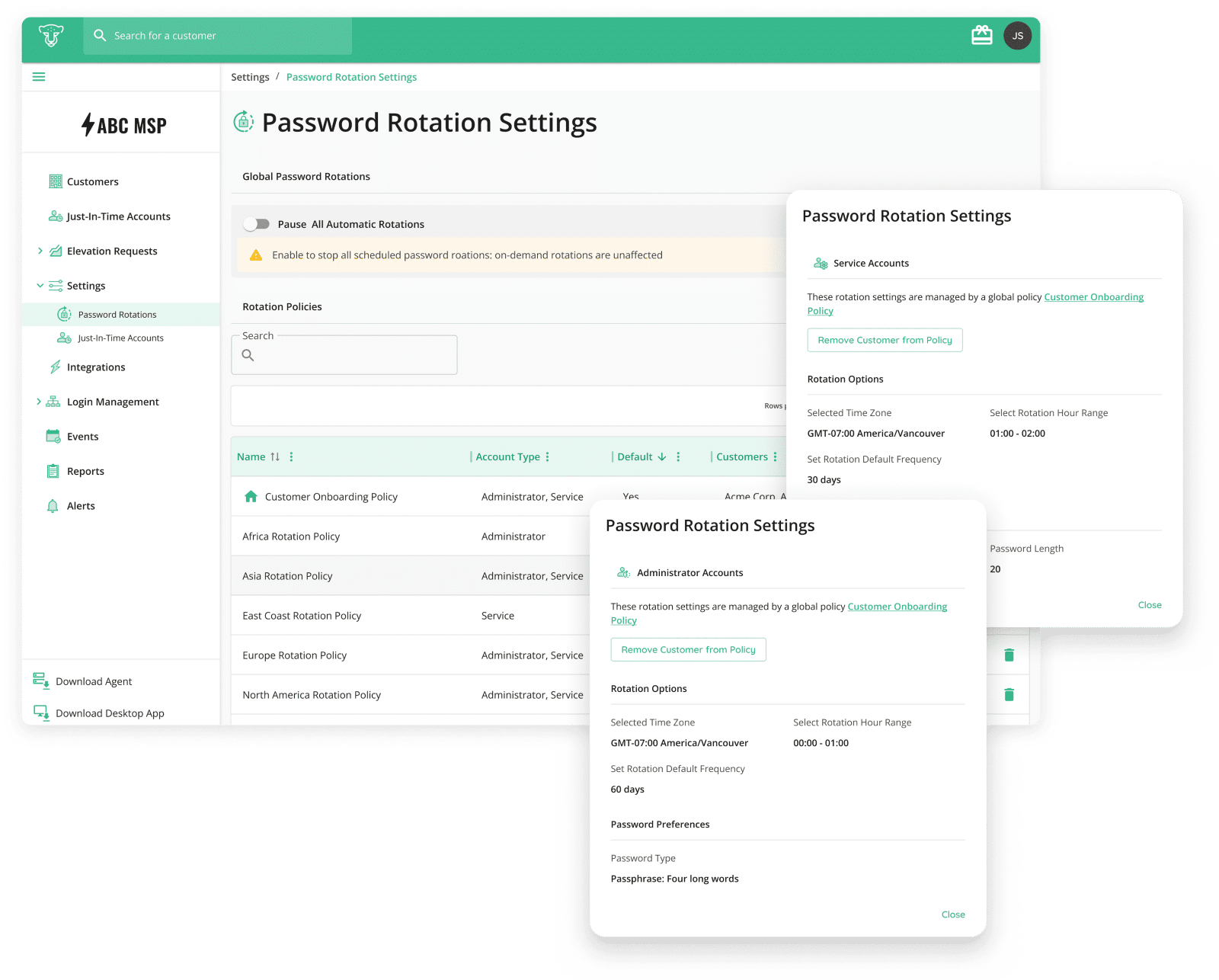
We’re thrilled to announce a powerful new feature in our Privilege Access Management (PAM) Platform at CyberQP—Password Rotation Policies. This innovation is designed for Managed Service Providers (MSPs) handling privileged account security, especially those managing dozens, hundreds, or even thousands of clients. With CyberQP’s Password Rotation Policies, MSPs can define, manage, and apply password rotation settings across multiple customers from a single dashboard. No more setting up rotation rules individually—now, you can create a policy once and apply it globally.
Why This Matters for MSPs
Save Time & Reduce Manual Work
- MSPs can now set it and forget it—define rotation rules once and apply them to multiple customers automatically.
- Enhanced Security: With global rotation policies in place, you can ensure that every account adheres to the latest security standards, minimizing vulnerabilities across your client base.
- Regulatory Compliance: Many industries require strict compliance with security protocols. Implementing standardized password policies can help you meet these regulations efficiently.
- Reduced Risk of Human Error: By standardizing password settings across multiple customers, you minimize the likelihood of inconsistencies and human mistakes that can lead to security breaches.
Key Features of Password Rotation Policies
- Global Rotation Policies MSPs can now create global rotation policies for admin and service accounts. This feature allows you to establish a uniform password rotation schedule that can be applied to multiple customers in just a few clicks, streamlining your management process.
- Default Policy for New Customers Setting a default policy ensures that every new customer account created in CyberQP automatically adheres to your established security standards. This proactive approach simplifies onboarding and strengthens security from the outset.
- Standardization Across Customers By defining consistent rotation settings, you can maintain high security levels across your entire customer base. This uniformity reduces the risk of discrepancies and ensures that every account remains protected.
- Streamlined Management for Large MSPs For MSPs juggling dozens, hundreds or even thousands of customers, this feature is a game-changer. It allows for efficient password management, freeing up your team to focus on delivering exceptional service and support to your clients.
Empowering Your Team
Permissions for managing Password Rotation Policies are limited to admin roles on the QGuard plan, ensuring that only authorized personnel can implement and modify settings. This additional layer of security helps you maintain control over critical account management functions.
Why Choose CyberQP?
The introduction of Password Rotation Policies on CyberQP marks a significant advancement in account security and operational efficiency for MSPs. By centralizing control over password settings, we empower you to safeguard your customers’ accounts while simplifying your operational processes.
Are you ready to elevate your security practices and streamline your account management? Log into your CyberQP account today and implement Password Rotation Policies across your customer base!
For more information, reach out to our support team or visit our documentation. Together, let’s secure the future of your clients and your business.
Stay secure and happy managing!
—
CyberQP redefines help desk security through privileged access management, help desk verification, and user privilege elevation. We empower MSPs and IT professionals to eliminate standing privilege risks, enforce compliance, and streamline operations. Committed to “Empowering Access, Redefining Privilege,” CyberQP protects accounts, credentials, and identity verification with innovative, efficient solutions. Learn more at https://cyberqp.com/tours/